🗝️ Which AI assistant should you hire?
"In any moment of decision, the best thing you can do is the right thing, the next best thing is the wrong thing, and the worst thing you can do is nothing." – attributed to Theodore Roosevelt
🔑 This issue at a glance (2-second summary)
Just about every tech giant now sells an AI assistant that remembers you and works without being asked. Decide whether you want to rent one or own one, then pick and start this week.
Rent vs. own
After every workshop I've run lately, the same question comes up over dinner: which AI assistant should I use?
Meta has Muse.
OpenAI has Dots.
SpaceXAI has Grok Bot.
Instinct lets you text an assistant like a friend. (I tried it, then disconnected it, because I couldn't tell where my data was going.)
Viktor joins your team's Slack.
OpenClaw kicked off this whole race earlier this year, and open-source Hermes followed.
At one of those dinners last week, I said, "Anthropic will come out with one any day now." The next morning, they launched Claude Duet.
I've actually been teaching about AI employees for two years. Back then, the closest we could get was pushing custom GPTs and Claude Projects to their limits. Now a new AI assistant drops every week.
Dozens of options. All promising an assistant that remembers you, works while you sleep, and acts before you ask.
The number of choices is overwhelming. So most people pick nothing.
Researchers saw this coming a generation ago. At a grocery store in Menlo Park, psychologists set up a jam tasting table. Some days it held 24 flavors. Other days, just 6. The big table with more choices drew more shoppers, but only 3% of them bought a jar. At the small table, 30% did.
Offering fewer choices led to ten times the close rate.
Psychologist Barry Schwartz called it the paradox of choice. Later research found it doesn't happen every time. It hits hardest when the options are complex and you aren't sure what you want. That describes AI assistants perfectly.
So stop hesitating while you compare every product on the shelf. They'll leapfrog each other every month anyway.
Answer one question: Do you want to rent your assistant, or own it?
Renting is easy. You move in fast. When something breaks, the landlord fixes it. But you are subject to the landlord's whims.
Owning takes more work up front. More responsibility. More hassle. But you can configure it how you want, and everything you build stays yours.
That matters because these assistants get better the more they know you. Every system you connect and every process you teach makes it more valuable, and harder to leave.
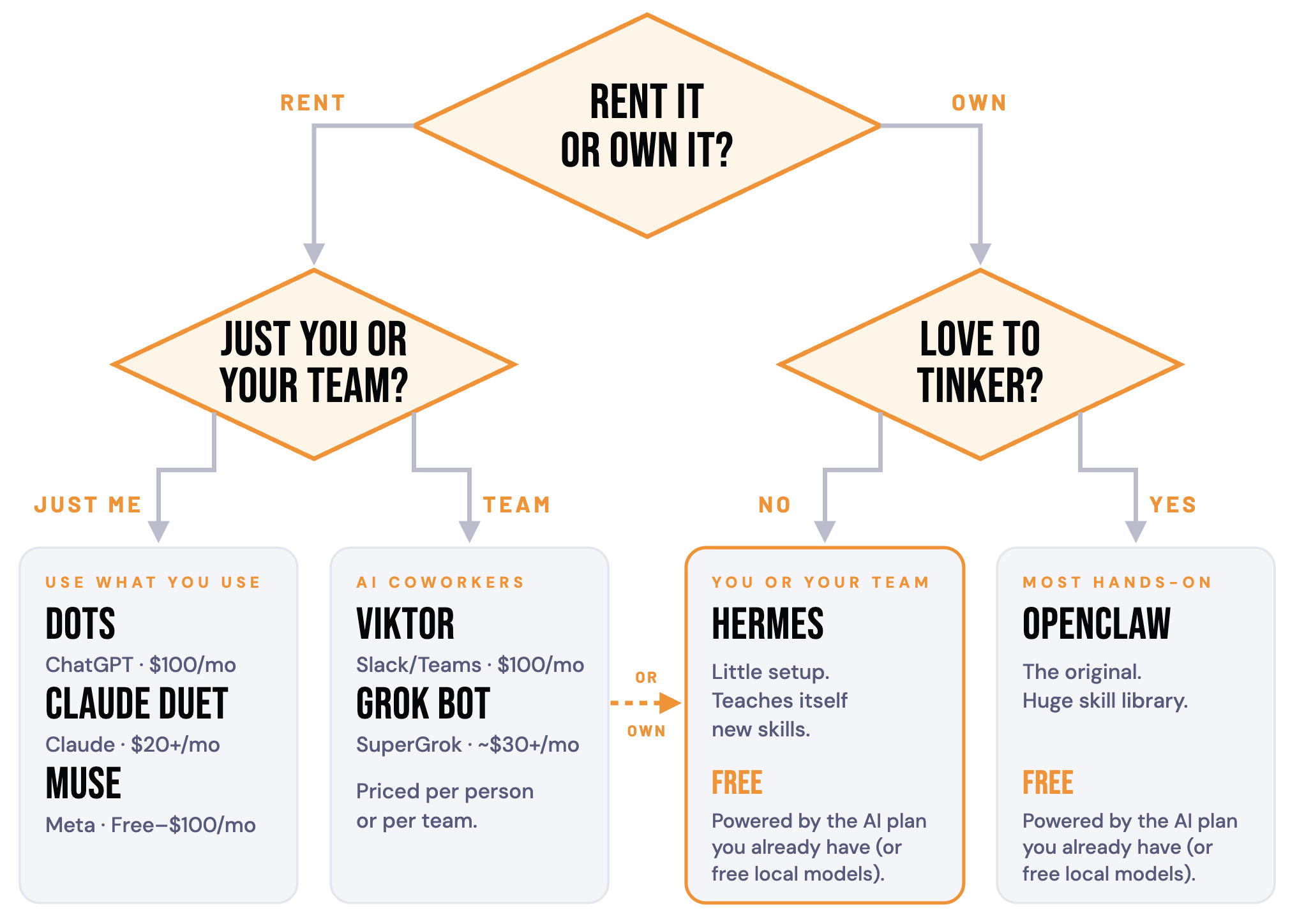
Dots, Muse, Claude Duet, Grok Bot, Viktor, and Instinct are rentals. The company holds your assistant's memory and skills. If the rules change, your assistant stays with the landlord.
That happened this summer. Remember when the U.S. government forced Anthropic to restrict access to their best models (Fable & Mythos) for 18 days? Renters waited. Owners running OpenClaw or Hermes could plug in a different model and keep working.
Hermes and OpenClaw are ownership. Free, open source, running on your own computer. Memory and skills live in files you can read, back up, and move to any AI model.
I choose to own. My assistant Henley runs on a Mac in my office. I can run him for free on open-source models. Or I can plug in Claude or ChatGPT through the subscriptions I already pay for, with no pay-per-use bill, and switch between them in the middle of a conversation. Same memory. Same skills. Different brain whenever I want.
Owning used to mean staying up until 3 a.m. Today it takes an afternoon. Renting takes ten minutes. What's your preference?
Pick one this week. You can always move, but you can't get back the months you spent waiting.
Winners take action
Make your decision in 10 minutes with the flowchart below. Then give whichever assistant you pick three starter documents:
Personal context file: who you are, your goals, how you work.
Business context file: what you sell, to whom, and how.
Brand voice instructions: how you sound when you write.
Keep all three in a folder you own, like Google Drive or your computer. The payoff: you get the speed of renting with the freedom to move whenever a better option shows up.
The tools you need
Challenge: Your current AI already knows a lot about you. Switch assistants and you start over at "Hi, my name is..."
Solution: Make your current AI write the onboarding document for your new one. Paste this into ChatGPT, Claude, Gemini, or whichever AI you use most. It works best with memory turned on.
I'm hiring a new AI assistant, and I want it to know me as well as you do on day one. Using everything you know about me from our past conversations, saved memory, custom instructions, and any projects or files I've shared, write a complete onboarding document for my new assistant.
Organize it under these headings:
Personal context: who I am, my role, my background, my values, my goals for the next 90 days and the next 3 years, and how I like to work and communicate.
Business context: what my business does, who we serve, our offers and pricing, my team, the tools and software we use, our key processes, and our biggest priorities and challenges right now.
Brand voice: how I write and speak, words and phrases I use, words I avoid, my tone, my formatting preferences, and 2 or 3 short examples that sound like me.
Current situation: active projects, open decisions, deadlines, and what's on my plate this month.
Working rules: things I've corrected you on, preferences I repeat, and anything I always or never want.
Gaps: what you don't know about me that my new assistant should ask me.
Rules: Be specific. Use real names, details, and numbers instead of general summaries. Do not invent anything. Mark anything you're unsure about with [VERIFY]. If a section is thin, say so. Write it so a new assistant with no access to our chats can read it and get to work. Format it in clean Markdown I can save as a file.
Read it before you hand it over. Fix anything marked [VERIFY], and delete anything you wouldn't want stored, like passwords or account numbers. Then save it in your folder. Sections 1, 2, and 3 are the first drafts of your three starter documents.
This week on the pod
On the most recent episode of King Moves (Are You Still Doing Work Your AI Could Handle? | Ep. 154), Justin and I dig into some of the most useful things our AI assistants are doing for us lately: editing our podcast start to finish, renaming hundreds of "untitled" recordings, organizing thousands of files in the downloads folder, spotting a monthly task and offering to automate it, reviewing every coaching call through the eyes of five coaches Justin admires, and more.
Neither of us has a coding background. If we can build this, so can you.
Stop playing life on hard mode. Automate your success.
Until next week,
Ethan King
Actionable Simplicity™ for ambitious leaders
Keynote Speaker | Author | CEO | Strategist
P.S. Installing your AI assistant takes an afternoon. Getting it to actually run your business takes most people weeks to months. Avoid the expensive mistakes and time-wasters. In Build My AI Team Live (Oct 26 and 27, 4–6pm ET), we do it together. You leave talking to your AI assistant like a human, with it doing real work inside your business. Guaranteed. Your context loaded, your apps connected, and the security locked down, plus 30 days of support.
And the best part: you own it. You won't be tied to any one platform for the rest of your life. buildmyaiteam.live
P.P.S. Upcoming events:
Oct 29: EO New Jersey, AI Beyond the Hype, Part II
Nov 4: EO El Salvador, Full-Day Immersive Workshop
Nov 12: EO Iowa, AI Beyond the Hype, Part II
Dec 16: Spartan Surfaces, National Sales Meeting Keynote
P.P.P.S. Want to bring private training and/or implementation to your team? Just reply to this email to learn more.